Long Story short…my sister (yes i have siblings, not really suprising.) somehow learned on how to make animation…like a wave animation (didn’t see how it looked), and a walk cycle…it looked pretty great, but it felt…unfinished to me.
Do treat these opinions with a grain of salt, i don’t know much about animation.
They didn’t even use moon animator plugin…but that’s fine as it is.
Thing is…how does the process of animation and the making of various animation effects work? i assume you need some knowledge of Blender making, too (the donut curse is gonna strike me soon.), considering if you want to make something outside of roblox, you gotta sculpt something yourself.
Yes, i might get into animation, who knows how hard it is, i just want any advice you can give me on it.
I really need to make my own Art Kitchen someday, maybe in 5 bussiness days, maybe in a month? a year? who knows.
I’d recommend you start with learning the twelve principles of animation first to get a grasp of what makes a good animation.
12 Principles of Animation Explained! [With Examples] - Animaker
You don’t need anything special to start animating, just use whatever tool you’re the most familiar with, be it blender, studio, or even hand drawn. (Would recommend roblox studio since it’s pretty easy to start out with and you have characters already made and rigged.) Now you just have to consistently apply those principles in animating subjects and you’ll be able to steadily improve.
terrible at drawing, maybe in the future.
Question is…
Is it possible to add accessories to the rig somehow, like via scripts or something else?
Yep that’s pretty easy with an accessory importer:
You can just import the accessory by copy and pasting the accessory ID into the plugin in, then moving the imported accessory to the player’s model.
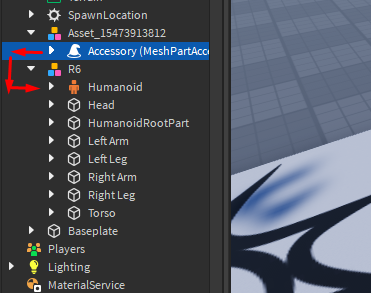
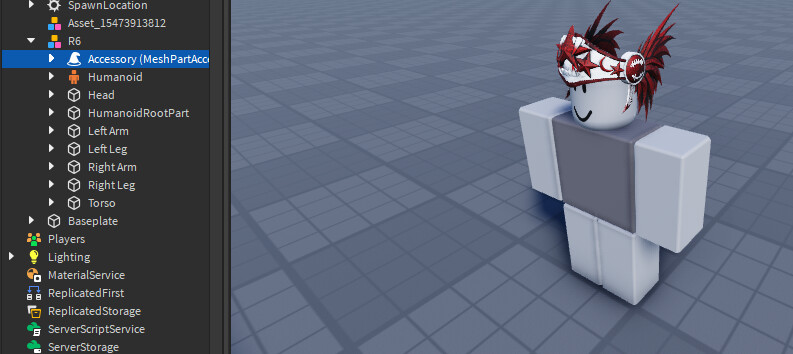
If you plan on animating weapons and more complicated things, consider looking into Welds and M6Ds
Is it adjustable in a way Catalog Avatar Creator does it?
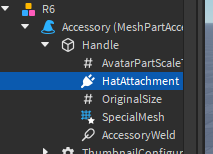
Yes, you can alter the hat attachment in the accessory to change where the accessory is placed
great, that’s really good.
many thanks.